Guide · QuickBooks OnlineConvert a supplier price list to a QuickBooks CSV
QuickBooks Online imports products and services through a mapping wizard — and the less your file matches Intuit's sample layout, the more hand-mapping and red flags you get. The fastest path is to convert the supplier file into that exact layout, with the one value Intuit's own sample gets wrong already corrected.
What QuickBooks actually needs
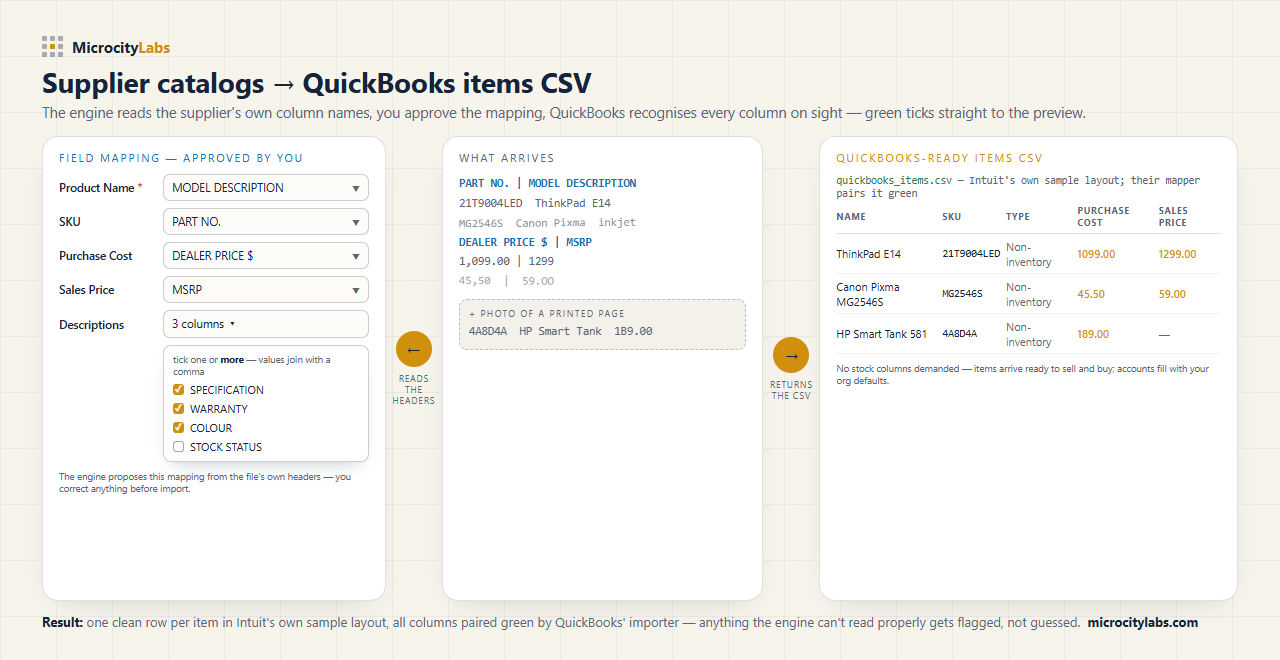
- Intuit's sample columns: Product/Service Name, Sales Description, SKU, Type, Sales Price / Rate, Taxable, Income Account, Purchase Description, Purchase Cost, Expense Account — plus the inventory columns you leave empty for a price reference list.
- The Type gotcha: the importer accepts only Service, Inventory and Non-inventory — WITH the hyphen. Intuit's own downloadable sample spells it “Noninventory” and the import preview flags exactly that value in red. One hyphen, and the same rows import directly.
- Non-inventory items: no Quantity on Hand, no as-of date, no asset account demanded — supplier catalog lines stay a clean price reference.
- SKU carries the part number: so the list stays searchable by the code your supplier quotes.
Why supplier files break the import
Suppliers send price lists as PDFs with section banners, merged cells, footnotes and mixed price formats — sometimes photographed pages. Retyping them into a QuickBooks-shaped spreadsheet takes hours per supplier, every time prices change, and a single shifted row attaches the wrong cost to the wrong SKU.
The fast way: upload the file, get the CSV back
The MicroCity engine reads the supplier file as it arrives — PDF, Excel, scan or photo — and returns a CSV in Intuit's sample layout, Type already Non-inventory. The layout is certified against a live QuickBooks Online company: the import wizard paired every column green automatically and the rows imported without errors. Anything the engine can't read properly gets flagged, not guessed.
Honest limit: the engine returns the import file — it does not connect to your QuickBooks company or write to it. You run the import wizard yourself and review every line before it goes in. That is by design.
Or the engine does it for you — from £15 per file
Upload your supplier file, check the free 2-page preview, and pay once for the whole file — no account, no subscription. Recurring feeds fit the monthly plans; bookkeeping for clients? Email contact@microcitylabs.com.