Guide · Zoho BooksImport supplier price lists into Zoho Books
Zoho Books imports items from a CSV or XLS where every item is one clean row and every column is mapped to a field — and supplier price lists never arrive that way. The fastest path is to upload the supplier file as it is, PDF, Excel, scan or photo, review the product table the engine builds from it, and either download an items CSV made for the import wizard or push the rows straight into your organisation as items.
What the Zoho Books import wizard needs
- One row per item. Items > Import Items reads CSV, TSV or XLS only. A PDF, a scan or a photo of a printed page cannot be uploaded.
- Mapped columns. Item Name, SKU, Rate (selling price), Purchase Rate, Description, Unit — each column matched to a field on the import screen, every time.
- Clean values. A price with a currency symbol, a description that spans five variant rows, or a section banner in the middle of the table either fails the import or lands on the wrong item.
- A sellable decision per row. An item with no selling price should be a purchase-only item, not a sales item at price zero.
Why supplier files break the import
A real supplier price list is a 40 to 100 page PDF with section banners, merged cells where one description covers several variants, prices in mixed formats, sometimes a photographed printed page. Retyping it into the Zoho template takes hours per supplier, every time prices change, and one shifted row puts the wrong purchase price on the wrong SKU.
The fast way: read the file, then CSV or direct push
Upload the supplier file to Anything to Database as it arrives. The engine reads it page by page with a visible status and page counter and returns a product table you can check and correct — a header, a shifted column, a price. Then choose one of two exits under Send to store / ERP / accounting:
- Zoho Books / Inventory items CSV. The headers are the import wizard's own field names, so the wizard auto-maps them. Rows without a selling price are marked not sellable, Item Type Purchases. Certified by a real import into a Zoho Books organisation.
- Push straight into Zoho Books. Connect your organisation once — you approve it on Zoho's own consent page, no token to copy. Map the columns to Item Name, SKU, Purchase Rate, Rate, Description, Brand, EAN/UPC. Push one test item, open it in Zoho Books, then untick the safe test and send the rest. Items are created through the Zoho Books API; an item whose SKU or name already exists is skipped, never overwritten.
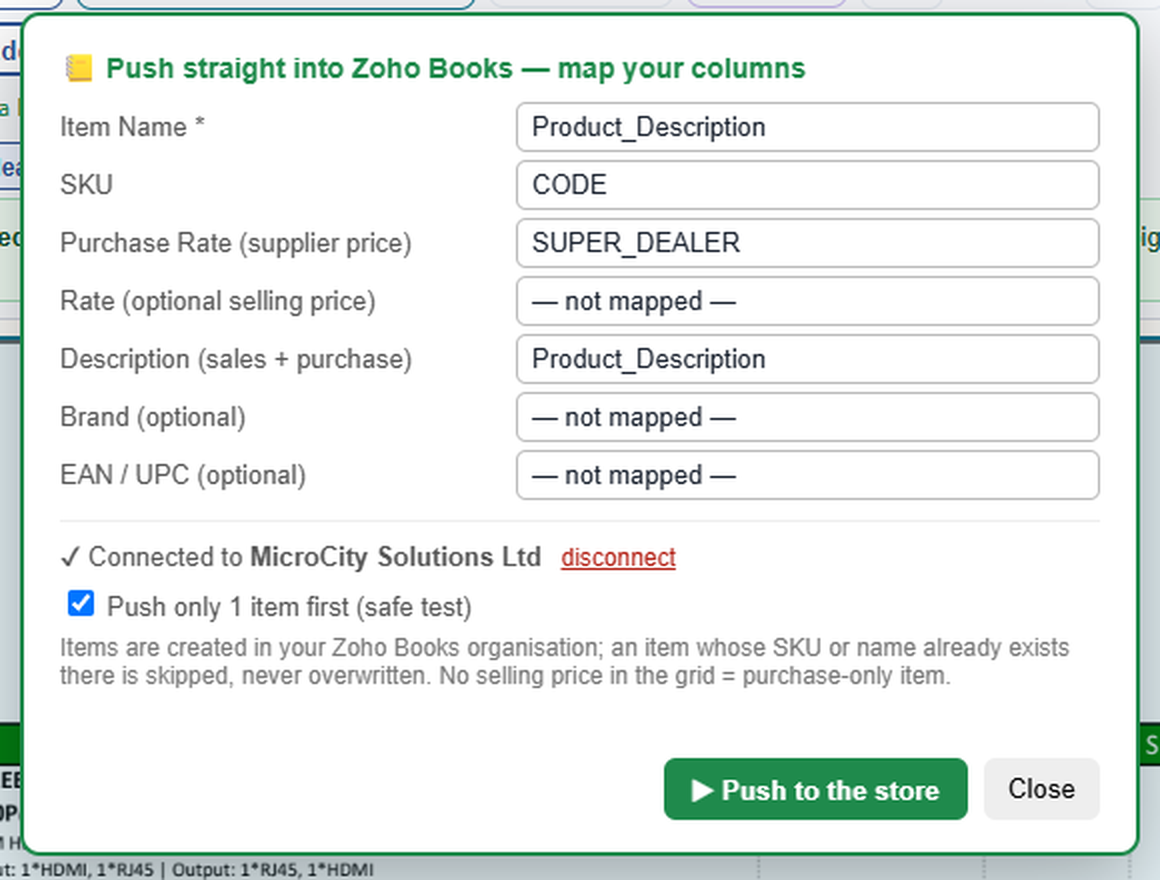
- Reads PDF, Excel (.xlsx / .xls), CSV, scans and photos (JPG, PNG), including multi-page files and merged cells.
- Remembers each supplier's layout, so next month's price list from the same supplier takes seconds.
- Needs a Microcity Labs account. The free allowance lets you try it on a real price list; larger volumes need a paid plan on microcitylabs.com.
- Sends the supplier file you upload to our servers to be read, and the resulting rows to your Zoho Books organisation only when you click Push. Nothing else in your organisation is read or changed. Disconnect any time from the app or from Zoho's connected-apps page.
Honest limit: the push creates items once. It does not update prices or stock afterwards, does not create bills or purchase orders, does not fetch images or specs from manufacturer sites, and does not touch invoices. You check the table before it goes in. That is by design.
Set-up in three steps
- Create a free account on microcitylabs.com and open the studio. Upload a supplier file and let the engine read it; correct anything in the table.
- Send to store / ERP / accounting > Zoho Books — push. Click Connect Zoho, sign in to Zoho, approve the access, and you are back in the studio with your organisation named.
- Check the column mapping, push one test item, open Items in Zoho Books to see it, then untick the safe test and push the rest. Prefer a file? Choose the items CSV instead and use Items > Import Items.
On Xero, QuickBooks or Sage instead? Same engine
The same product table exports as an items file for Xero, QuickBooks Online and Sage, or as CSV and Excel for anything else. Plans and the agency tiers are on the pricing page; running Zoho Books for clients? Email contact@microcitylabs.com.